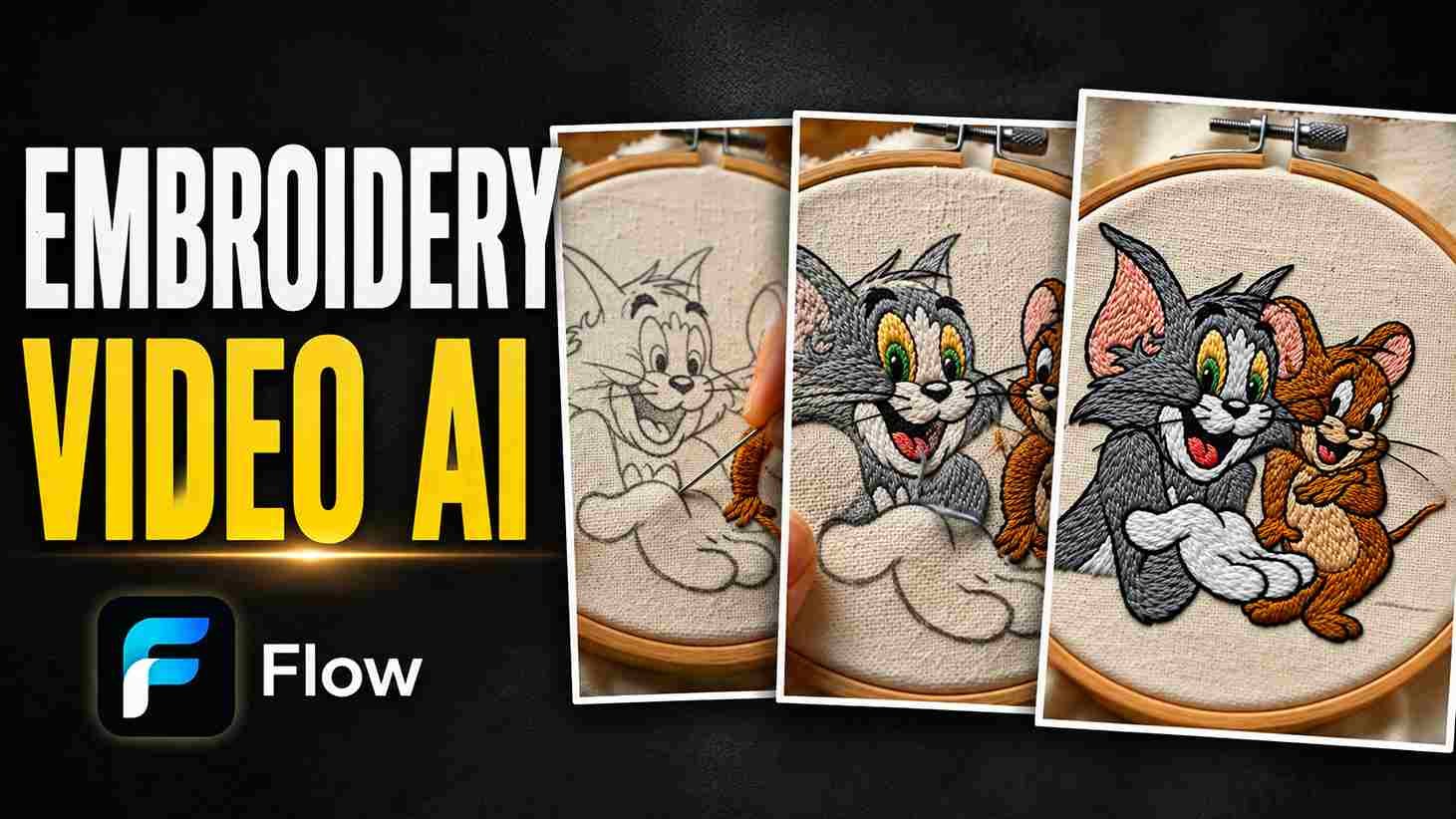
So, hey guys, you must have also seen such a video on Instagram, YouTube, TikTok, and Facebook. In which any picture is embroidered on a cloth. In which a girl takes a needle and thread and puts a white cloth in the embroidery frame and embroiders the picture on top. Which is very annoying to watch. Because these days, whenever I use Facebook and Instagram, one such video comes after another, which made me feel that making such a video can give good engagement at that time. I personally liked it a lot, and I started looking for how to generate it. If you also want to make such a video, as I have shown in the image above. I have also uploaded such a video on the Instagram page. So if you want to make it, then you have to read this article completely. It gives you a complete A-to-Z guide so you can create the video.
Why This Embroidery Trend?
It became trending on social media at that time because, if you go back a little bit, people used to like embroidery very much, which was done by hand. But with time, machines started doing this work. This was a lot of cleanliness, but people stopped liking it. Because they understood the skill of the hands. And along with that, it took a lot of time to make it. If you wanted to do even a little embroidery, it could take you three or four days.
But now it has come in a special way. In which you can get your picture embroidered. Earlier, flowers etc. were made, but since it is being embroidered with your face, it looks amazing. People see it in a very different way and like it and it is done exactly with the help of AI as if an ordinary girl had done it with her hands, which looks very cool to watch and everyone likes to make such videos.
What You Need Embroidery Videos
For this, you will need a good HD-quality image in which nothing is visible; otherwise, the embroidery may be damaged. Apart from this, if you remove its background from any app and set it to white, it will work even better. Because AI gets confused while embroidering the background. It has different colors, so you will not get the right result there. You can also do this with ChatGPT. You simply upload your image to it and tell it to put its background white. Do not change anything else; it will create a white-background image in a few seconds, which you can use for embroidery.
Once the image is generated, you will need an image-to-video tool. Google Flow is perfect for creating such videos because it provides free credits that you can use to create videos.
How to Create Embroidery Videos Step-by-Step
Pick the right photo first
- For this, you choose a perfect image.
- Now open UpChat GPT to make its background white.
- Click on the plus icon below and select the gallery and upload your image here.
- Tell UpChat GPT to make the background of the image white. Apart from this, do not make any simple changes to it.
- Now send it.
- It will whiten the background of your image in a while and give it to you. Now you can type on it and download it. Your image will be saved in the gallery.
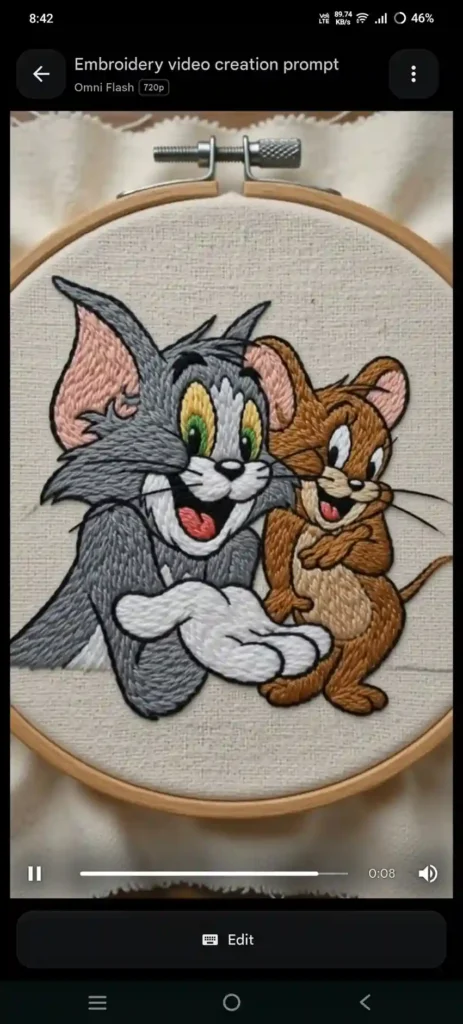
Image to Video Using AI
- Now I will give you a prompt in this article below.
- You copy it.
- And click on Generate Video below.
- Now it will take you to Google Flow AI.
- You sign up here through Gmail.
- Now here you have to understand all the steps.
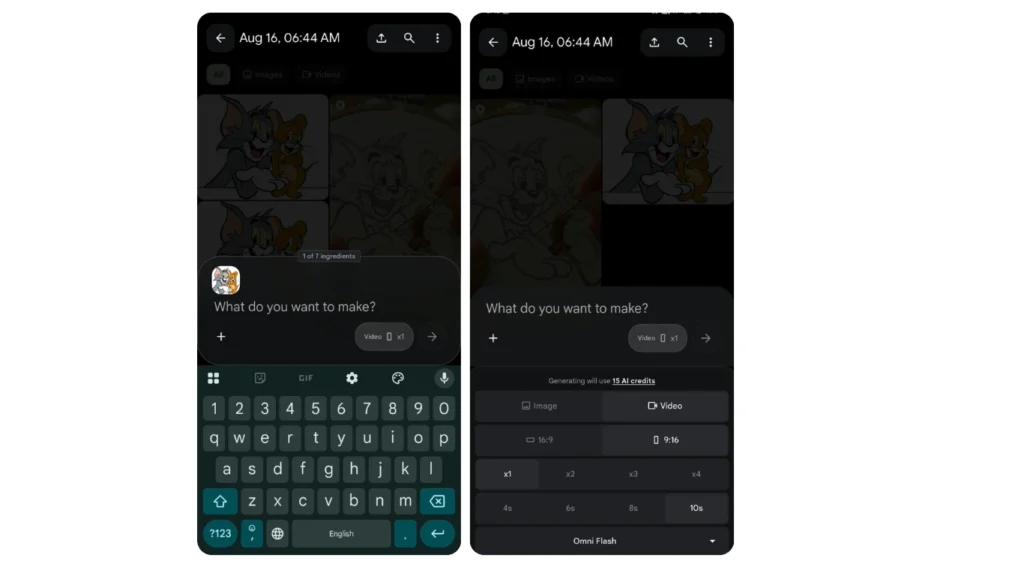
- For this, you have to click on the plus icon below and upload the image you have created from your chat GPT here.
- And on the other side, in the settings, you have to select your photo according to your friends.
- 1X has to be selected below it.
- On the second number, there will be two options, image and video; you have to select the video.
- Below, you have to select the number of seconds of video you want, 8 seconds or 10 seconds, in my opinion, 10 seconds will be the best.
- And you have to send it, now it will make a video from the image to you in a short time.
In which your image will be placed in a frame and it will be embroidered and embroidered, which will look exactly like someone has done it. If it does not work properly the first time, you can send it again. If there is still any problem, you can edit the prompt according to your own needs, which will also help you prepare the video very easily.
Avoid these Mistakes
Do not use low-resolution images in this otherwise, you will not get good results.
If you are making such a video for TikTok, YouTube short, or Instagram reel, then you have to select 9:16 from the beginning; otherwise, the results start getting bad later.
If you are editing the prompt, then give it clear-cut information; if you give too much information, then this AI tool gets confused. It follows some prompts at the beginning and skips all the other prompts, so choose short and clear prompts.
If you want to upload it on social media, then make sure to put some music behind it, which can give you good reach.
Embroidery Video prompt:
“Universal Dynamic Embroidery Image-to-Video Prompt (10 Seconds)Use the uploaded image as the ONE AND ONLY reference.Create a 10-second ultra-realistic macro cinematic embroidery-making video where the uploaded artwork appears to be hand-embroidered in real time.The uploaded image must remain 100% identical throughout the animation.Do NOT change:Characte identity Face Expression PoseClothing ColorsJewelryFlowerBackgroundCompositionCamera anglArt styleThe final frame must match the uploaded image pixel-perfect.The video should depict the embroidery process naturally progressing from unfinished stitching to the completed artwork shown in the uploaded image.Use realistic embroidery physics:Metallic embroidery needleCotton, silk, or metallic embroidery threads matching the artwork colorsSmooth thread tensionFabric slightly stretching with every stitchTiny finger movementsRealistic hand pressureThread looping through fabricAccurate embroidery textureSoft fabric foldsEmbroidery hoop holding the fabric tightlyMacro textile details visibleNo skipped stitchesNo sudden morphingNo AI warpingNo flickeringNo object deformation Lighting:Soft studio lighting with subtle shadows, realistic textile reflections, premium macro cinematography.Depth of field:Extreme macro lens, shallow depth of field, DSLR quality, ultra-sharp embroidery texture.Timeline00:00–00:02Camera: Macro close-up.Show artisan hands holding an embroidery hoop.A needle begins stitching threads matching the uploaded artwork.Only a small section is embroidered while the rest remains lightly sketched on the fabric.Each stitch is created one by one with realistic thread motion.00:02–00:04Camera: Slow macro pan.Continue embroidering the main subject from the uploaded image.Facial details, clothing, ornaments, textures, and important design elements gradually appear exactly as they exist in the uploaded image.Needle movement remains slow and realistic.00:04–00:06Camera: Macro close-up.The artisan stitches all remaining decorative elements including flowers, patterns, borders, accessories, textures, and background embroidery exactly matching the uploaded artwork.Metallic threads shimmer naturally while colored threads fill the design stitch by stitch.00:06–00:10Camera: Slowly pull back from macro to medium shot.The embroidery is now completely finished.The artisan gently removes the hand from the frame while the embroidered artwork remains perfectly still.The final frame must be 100% identical to the uploaded reference image, with every stitch, color, detail, texture, and composition matching perfectly.Global RulesUse ONLY the uploaded image as reference.Preserve identity and composition exactly.No redesigning.No added objects.No animation of the artwork itself.Only the needle, thread, hands, and embroidery process should move.The embroidery must grow naturally through realistic stitch-by-stitch sewing.Ultra-photorealistic macro textile quality.Cinematic 8K.Vertical 9:16.24 FPS.Premium handcrafted embroidery realism.The ending frame must be an exact recreation of the uploaded image”
Conclusion
I really enjoyed making this kind of video which I uploaded on my Instagram account. I have tried different prompts and I have got very good results on different images. If you are using it from the beginning, you will have a lot of fun with this Kari video because it works very well on a white background as I have mentioned three or four times in this article that you must keep a white background of your image. If you also want to make such a video then follow all the steps given above and you will also be able to make your embroidery video very easily.
Alan Edit video editing aur mobile editing tutorials par focus karta hai. CapCut, VN, AI video image aur baaki editing apps ke templates, presets, aur step-by-step guides yahan share kiye jate hain. Maqsad hai editing ko easy aur beginner-friendly banana.