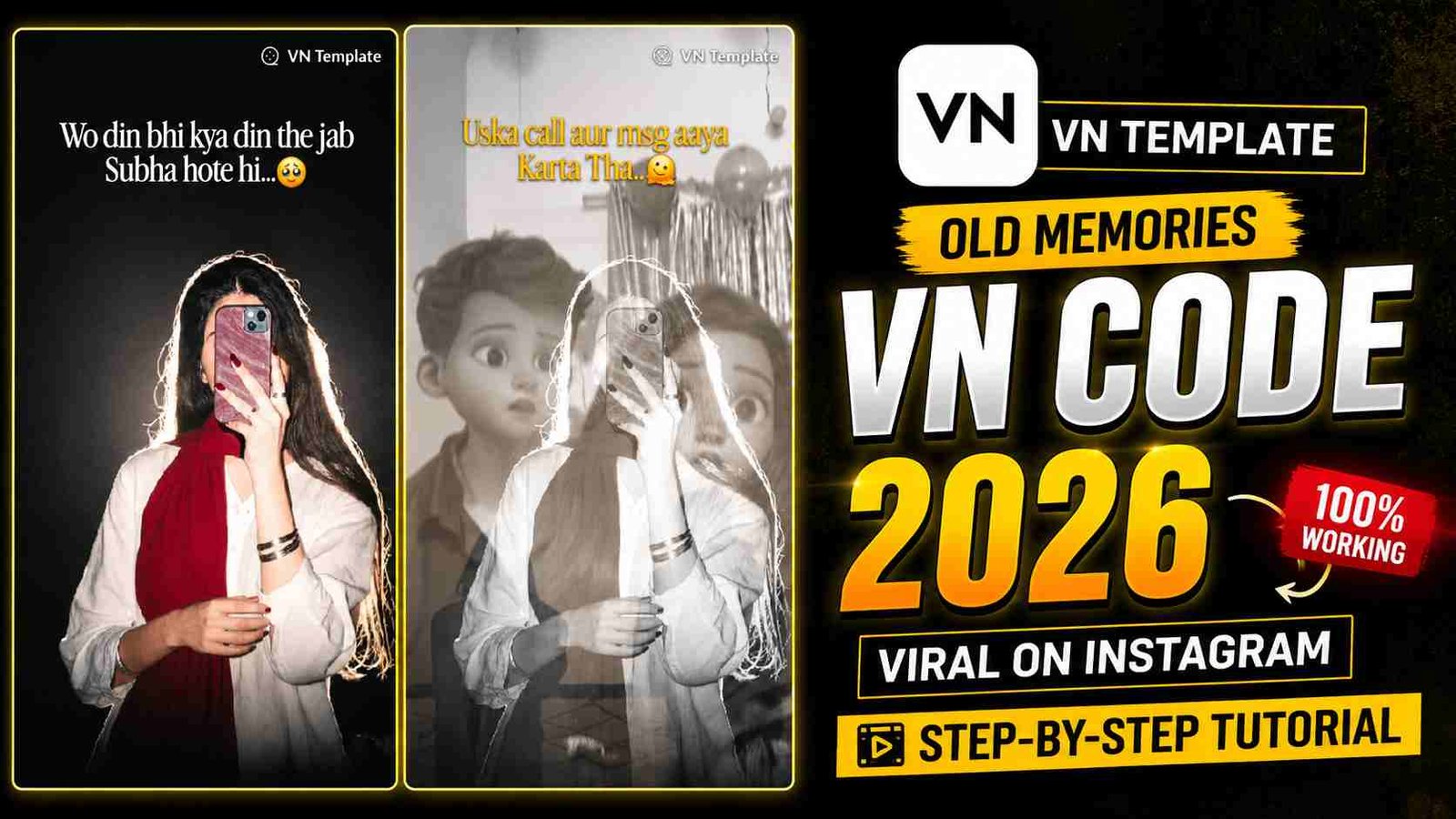
You must have noticed this on social media that nowadays, such old memories videos are being edited a lot on Instagram, TikTok and YouTube. Which are uploaded on social media. And people like to put them in statuses. Everyone says that my picture should be edited like this, which is a video made through a picture. It is very simple to make it if you also want to make it. So read this article till the end. I will also give you a VN code in it and along with it, I will also tell you the manual on how to edit it. You can edit such a video in this way as you find it easy, which will look very smooth to watch.
About Old Memories VN Code
In this edit, you will need a simple picture. In which you are sitting a little emotional. Because there is a song behind it which makes the video sad and emotional. The name of this song. ((majh ko arade de) is written on the top side of the picture (wah dan bhi kiya dan the) which creates a joke. If you post such a video on social media. Then people stop to read it.
And along with that, on its back, screenshots of your old chats like memes, some WhatsApp block and unblock screenshots. Similarly, Instagram comes one after the other. Their opacity is kept low which are slightly excessive and the video runs very smoothly. You can also edit such a video through this template. Otherwise, you can manually take your own screenshots. Which are of old chats, old memories. Which will make the video look very interesting.
Who Should Use Old Memories VN Code?
This is mostly used by those who have completed college, university or have broken up. They have old chats of their friends, of which they are creating videos by taking screenshots. Because this is an emotional template, when they see their old chats, they remember the time we spent together and where we are today, that is why this template is trending more.
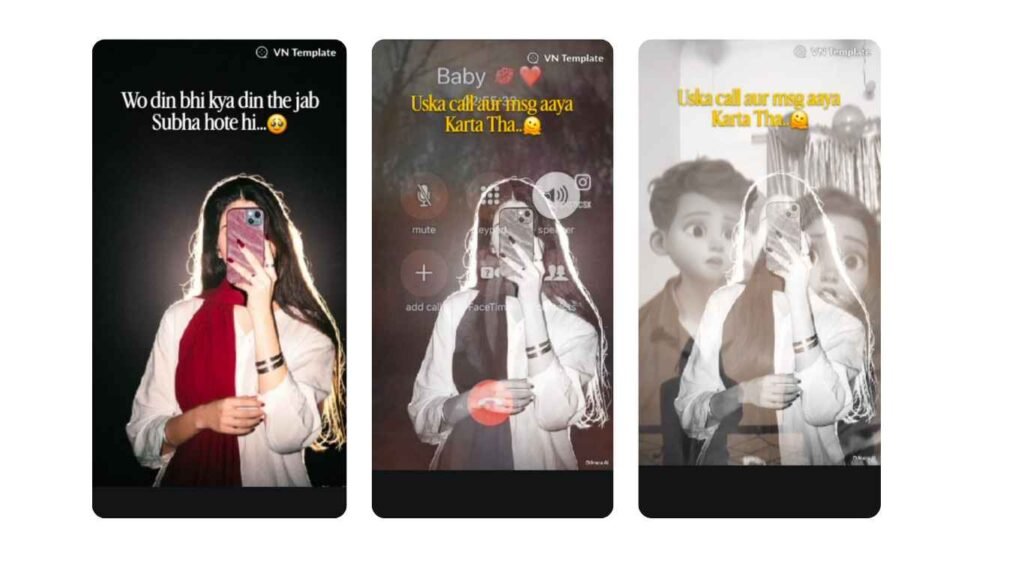

How to Create Old Memories Video Using VN Template
If you edit this video through the VN code, then you will have to follow these steps and you will be able to edit your video very easily in a few seconds and by following these simple steps. You will see a QR code above. You can take a screenshot of it or you can tap it and download it. Now it will be saved in your gallery, after that open the VN app, a scanner option will be visible on the top side, click on it.
After clicking, your mobile camera will open in front of you, there will also be a gallery option below, you have to select the gallery. Now select the QR code that you have downloaded or saved in the gallery. And it will start scanning. A template will be shown in front of you. You can download it. After downloading, click on the use thes template. You can select any image you like from your gallery and send it.
After a while, this video will be created for you. You can watch this video. If you need any further editing, you can do the manual editing yourself. Otherwise, if you add a perfect photo to it, then no editing will be required.
Manually Editing Old Memories Videos
Friends, if you want to edit this video manually, then you have to follow these simple steps, which will allow you to edit a professional video.
Step 1
For this you have to make a picture of yourself, you can make it in any pose. But if it is a front view of you, it will be even better. Now go to any app or any website in Google that removes the background of this photo. Remove its background. Now put a white background in the back of this photo and save it in the gallery.
Step 2
All the Old Memories, chat screenshots, call screenshots, Instagram file screenshots, and other old screenshots and photos you have, keep them all in one folder. Now open the VN app or any video editing app and import all the photos there. Remember that if you are making a short video, all the photos should be in a short frame and after a second on the high photo, you do not need to apply any kind of filter or effect on it. You can export it.
Step 3
Now select the audio for your video. The music that is usually used behind these videos is the song from the movie Aashiqui 2. You can use whatever you like, cut it from anywhere, if you don’t want to use it here, then select it from any social media you upload it to.
Step 4
Now open the final step up VN app which has the image up with background removed and import the screenshot video which was exported along with it here. And make its opacity 30%. And let the first five seconds of the picture run normally, then put the next few seconds of your clip and make its speed 3x. Now you will see that your sem video will be ready. You can write whatever text you want to write on top as you wish.
Tips for Old Memes Video Editing
Whenever you start recording a video, check whether your video is going to be short or long, otherwise after all the editing, you will have a lot of trouble changing its ratio, which will ruin the editing.
If you are making a video for shorts, select a 9:16 ratio.
All photos and videos used for editing should be in HD quality and should not have any blurring.
If you upload videos on social media, keep their length short so that the viewer doesn’t get bored.
When the video is finalized, export it to 1080 results so that the video’s evolution is not distorted.
Conclusion
So friends, in this article, I have told you how to make old memories videos. You can use whichever you like. In manual edit, you can use your own screenshots, while in the template, the first screenshot will be given. I have given you a complete guide here in a very easy way on how to make such an edit. You will not face any problem in this. If you still have any problem, you can ask me in the comments below and I will guide you.
Alan Edit video editing aur mobile editing tutorials par focus karta hai. CapCut, VN, AI video image aur baaki editing apps ke templates, presets, aur step-by-step guides yahan share kiye jate hain. Maqsad hai editing ko easy aur beginner-friendly banana.