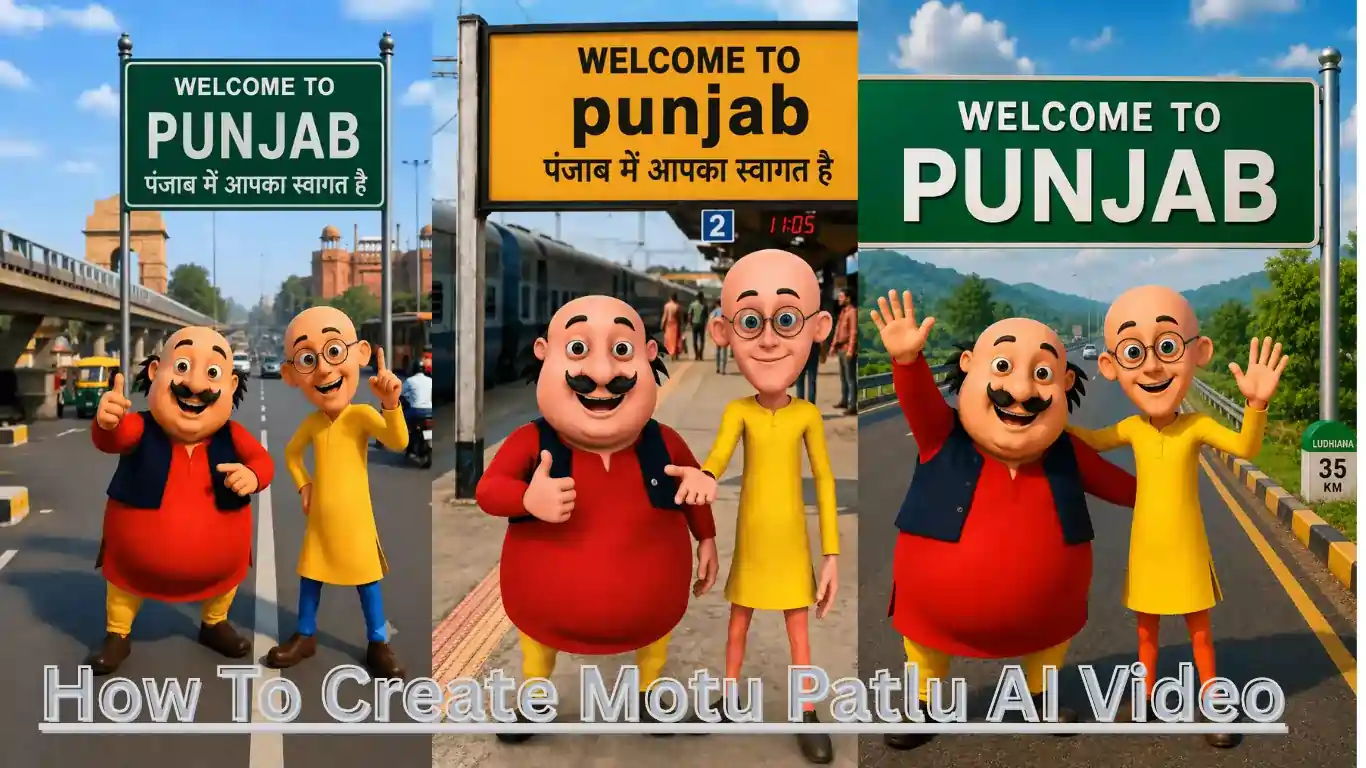
How To Create Motu Patlu AI Video 2026. Haye Friend mera naam Ailan hai aur main aap ko is article mein mukammal bataunga ke aap Motu Patlu ki AI video kaise create kar sakte hain. Jaise ke aap sab ko pata hi hoga ke aaj kal jo log social media istemal karte hain us mein Motu Patlu ka bohat trend chal raha hai jis mein Motu Patlu samne kharay hote hain. Is gaon ka naam ya shehar ka naam peechay board mein likha hota hai aur woh bolte hain ke aaj hum is gaon mein aaye hue hain.
Aisi video bohat viral ho rahi hain kyun ke Motu Patlu ko log dekhna bohat pasand karte hain kyun ke un ke cartoon bohat viral thay jis ki wajah se jab bhi logon ke samne un ki video aati hai to woh use like karte hain. Is ke ilawa log bohat khush hote hain jab woh un ke shehar ya gaon ka naam lete hain. Aisi video banane ke liye poora article read karein. Main is mein aap ko step by step full guide dunga jis se aap aasani se video bana sakte hain.
What is Motu Patlu AI video City and Village Name editing?
Aap soch rahe honge ke Motu Patlu ki yeh video kaise banti hain to yeh banana sirf ek minute ka kaam hai woh bhi AI ke zariye. AI ke zariye aap aisi video aasani se bana sakte hain. Jo aap apne account par upload kar sakte hain jis se aap ko kisi qisam ka bhi koi copyright nahin aayega. Is mein hum pehle AI ki madad se ek image banwayenge aur phir is image ko doosre AI ke paas le jayenge aur us se ek prompt denge aur woh humein us ki AI video bana dega aur is tareeqe se aap aisi video upload kar ke apne account grow kar sakte hain kyun ke is waqt in ka trend hai aur jo log trend follow karte hain un ka account bhi jaldi grow karta hai.
How To Create Motu Patlu AI Image
Aap bhi Motu Patlu ki jasi video banana chahte hain pehle aap ko us ki image leni hogi chahe aap ko social media par koi video pasand aa jaye to aap us ka screenshot bhi le sakte hain ya neeche main ne do screenshot diye hain aap ne un ko download kar lena hai aur ChatGPT ko open kar lena hai aur ChatGPT ke plus wale icon par click karna hai. Click kar ke aap apni screenshot ya yeh wala photo jo download kiya hua hai upload kar dein aur neeche main ne donon photos ki alag alag prompt bhi di hain aap un ko copy kar ke ChatGPT mein paste kar dein aur un mein yahan par Welcome To Punjab likha hua hai aap us ki jagah apne gaon ya shehar ka naam likh sakte hain aur ChatGPT ko send kar dena. Send karne ke woh aap ko image design kar ke dega aap ko use download kar lena hai. Ab us ki video banane ke liye aglay marhalay mein chalte hain.
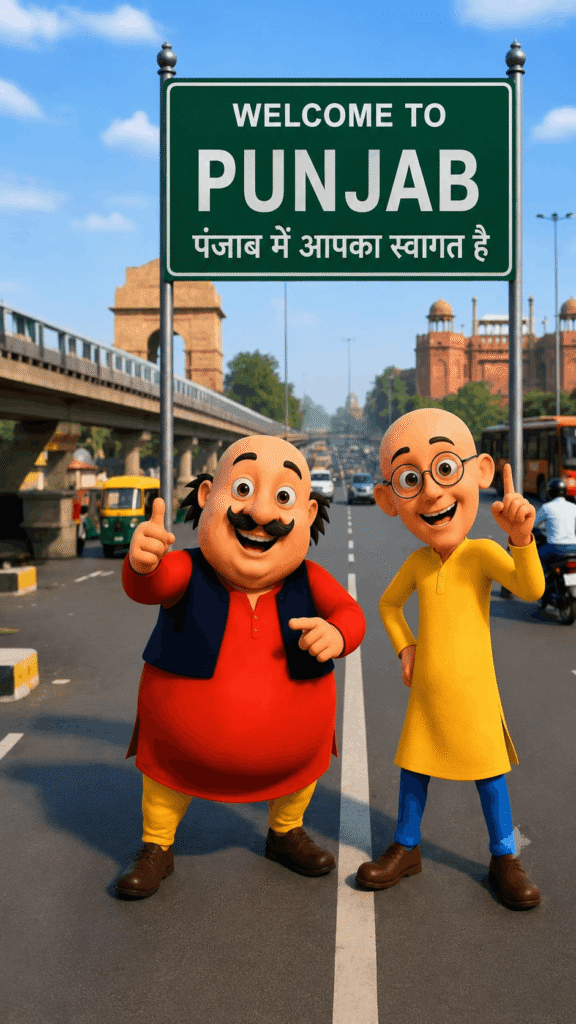
So, to edit the image that I have just given, Motu Patlu's appearance should look exactly the same. Do not change the color of his clothes at all, do not change the background, do not add or remove anything from him. So, the green board that is visible behind it should be replaced with what is written in it: WELCOME TO [PUNJAB][पंजाब में आपका स्वागत है] and its size should remain this and apart from that, do not make any changes, do not zoom in or zoom out, do not blur his face. Make an image that looks good quality and premium, ultra-detailed, 8K, vertical 9:16.
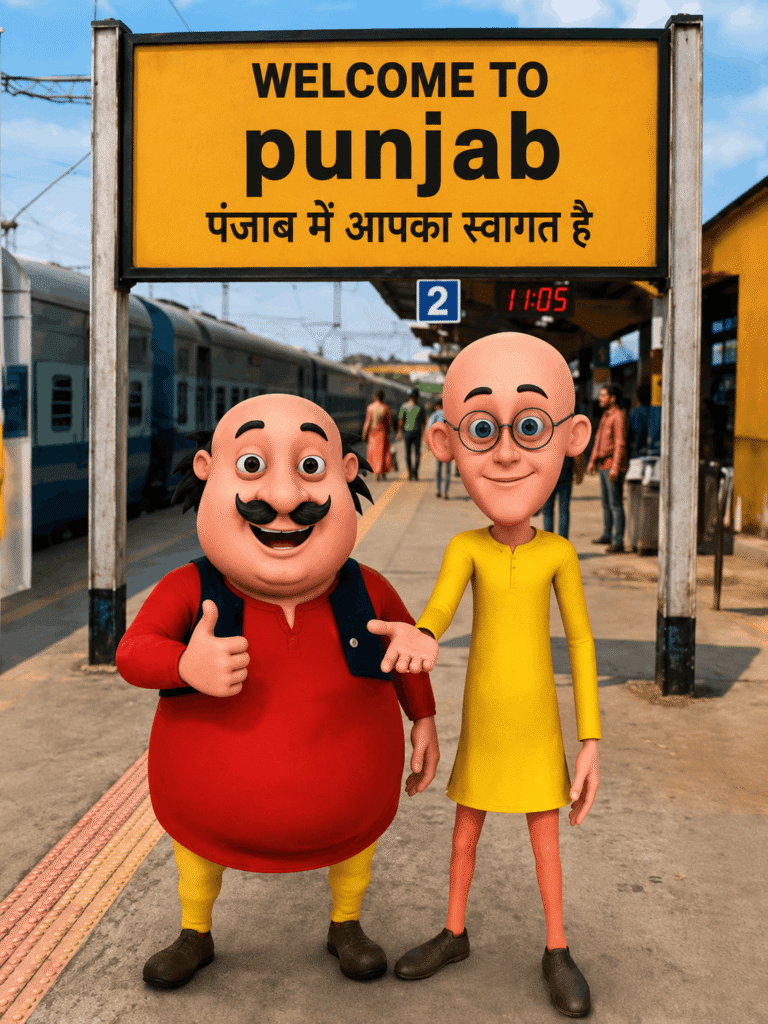
This is the image that I have uploaded now, so I have to edit it. In it, the Motu Patlu character should remain exactly the same. Do not change the color of any of his clothes, etc. The background of the image should also look exactly the same as if he is standing at the railway station. So, the yellow board behind him should be replaced with these words: WELCOME TO [punjab] [पंजाब में आपका स्वागत है] and the image should remain exactly as it is. Do not add anything else from me or remove anything from them. I want a perfectly similar image. Do not zoom in or zoom out, do not blur his face. Make an image that looks good quality and premium, ultra-detailed, 8K, vertical 9:16.
How To Create Motu Patlu AI Image To Video
To dosto Motu Patlu ki AI image generate karne ke baad aap ne yahan jo link diya gaya hai us website par chale jana hai. Yahan aap Google par search kar sakte hain Google Flow AI aur aap is website ko open karna hai aur website mein jane ke baad aap ne Gmail ke zariye log in kar lena hai. Yahan aap is ka app bhi download kar sakte hain aur log in karne ke baad aap ko upar ek plus wala button nazar aa raha hoga us press karna hai aur apni image jo aap ne ChatGPT se banwai hai us ko upload karna hai aur neeche aap ne Nano banana select karna hai. Is ke ilawa Flame select karni hai, 8 ya 10 second ki video select karni hai aur start wale mein aap ne image select kar leni hai aur send kar dena hai. Aap ki ek minute ke andar woh video tayyar kar ke dega. Ab aap woh download kar sakte hain.
I want to create a realistic 3D animated selfie of my given photo, which is 10 seconds long. There should be no changes in the body background, body expressions, clothing, body expressions, body background, the body is moving naturally, the eyes are blinking like a normal cartoon, and I am gesturing with my hand and adding a slight and steady movement of the camera. The body is smiling and saying, "हेलो दोस्तों, मैं मोटो हूँ। आज मैं पंजाब घूमने आया हूँ। यहाँ का माहौल बहुत अच्छा है। आज मैं पंजाब के गरमागरम समोसे खाऊँगा। " Now Patlu spoke. " दोस्तों, पंजाब बहुत अच्छा है। अगर आपको कभी मौका मिले, तो यहाँ ज़रूर जाएँ।" "Create a real highway atmosphere, such as cars passing by, birds flying overhead, soft sound, cinematic lighting, and a 9:16 ratio." The video should look completely natural.
To dosto is article mein main ne aap ko Motu Patlu ki AI video jo ke social media viral hai woh banane ka mukammal tareeqa aasani se bataya hai. Log aur bhi AI tool ka istemal karte hain lekin is ko use bohat aasaan hai aur aap aasani se ise istemal kar sakte hain. To agar aap bhi social media par viral hona chahte hain to jaldi se is trend ko follow karein kahin late na ho jayein. Agar aap ko video banane mein koi masla pesh aaye ya image create karne mein to aap bila jhijhak mujhe comments mein pooch sakte hain. Main aap ke comment ka intezar karunga. Milte hain aglay article mein, tab tak ke liye Good Bye.
Alan Edit video editing aur mobile editing tutorials par focus karta hai. CapCut, VN, AI video image aur baaki editing apps ke templates, presets, aur step-by-step guides yahan share kiye jate hain. Maqsad hai editing ko easy aur beginner-friendly banana.